WIP Monitor
How much work does this team have in flight right now, and is that too much? Scoped to whichever team is selected in the hub's top bar.
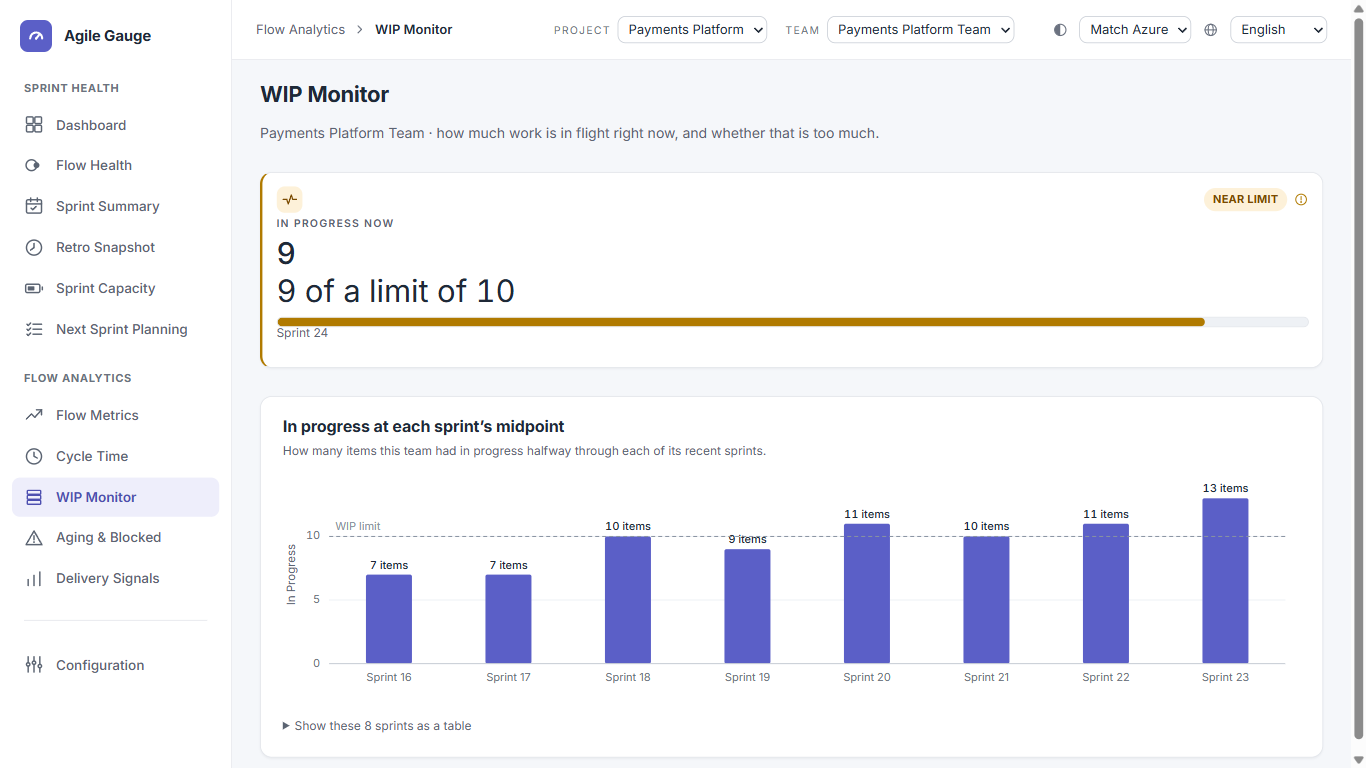
What you see
- An "In progress now" figure for the running sprint, with a badge — Over limit, Near limit, or No limit set — shown only when it needs attention; nothing extra is shown when things are fine.
- A meter reading "{count} of a limit of {limit}" once a limit is set, or a plain item count if it isn't.
- "In progress at each sprint's midpoint" — a bar chart of the last up to 8 sprints, with the WIP limit drawn as a reference line if one is set.
- If no limit is set: a banner explaining that, with a button straight into Configuration to set one.
How we calculate it
- "In progress"
- An item counts as in progress if it has a real work-start signal — a mapped in-progress transition, or an Activated Date — at or before the moment being measured, and is not already completed by that moment. Simply being created and parked in the sprint does not count as "started."
- The WIP limit
- Set in Configuration, and saved for you, for this team — it is a personal setting, not a shared team-wide one. Two people on the same team can each set a different number and each will see it as saved; Configuration says this plainly next to the input.
- What counts toward WIP
- Only the work item types your organization has configured to count toward metrics (Configuration → Item Types) — by default, planned work (stories/PBIs/requirements), bugs, and research items. Tasks and other types are excluded by default unless you add them.
- Status thresholds
- Over the limit is "over limit." At 80% of the limit or more (but not over it) is "near limit." Exactly at the limit counts as "near," not "over" — only strictly exceeding it does. No limit set is its own distinct state, never treated as "healthy."
What you can click through to
Only the "no limit set" banner's "Open Configuration" button. The count, the meter and the history chart don't drill down to a work-item list on this view.
Tip
If a teammate sees a different WIP limit than you do for the same team, that isn't a bug — the limit is saved per person, not shared. Agree on one number as a team and each set it the same way.
Known limits
- Scoped to one team at a time — no all-teams table.
- No CSV export.
- The "near limit" threshold is fixed at 80% and isn't configurable per team from this screen.
- History is capped at the last 8 sprints.