Retro Snapshot
For one team's one finished sprint: how did it go against goals and against the sprint before, and what's worth actually talking about at the retro?
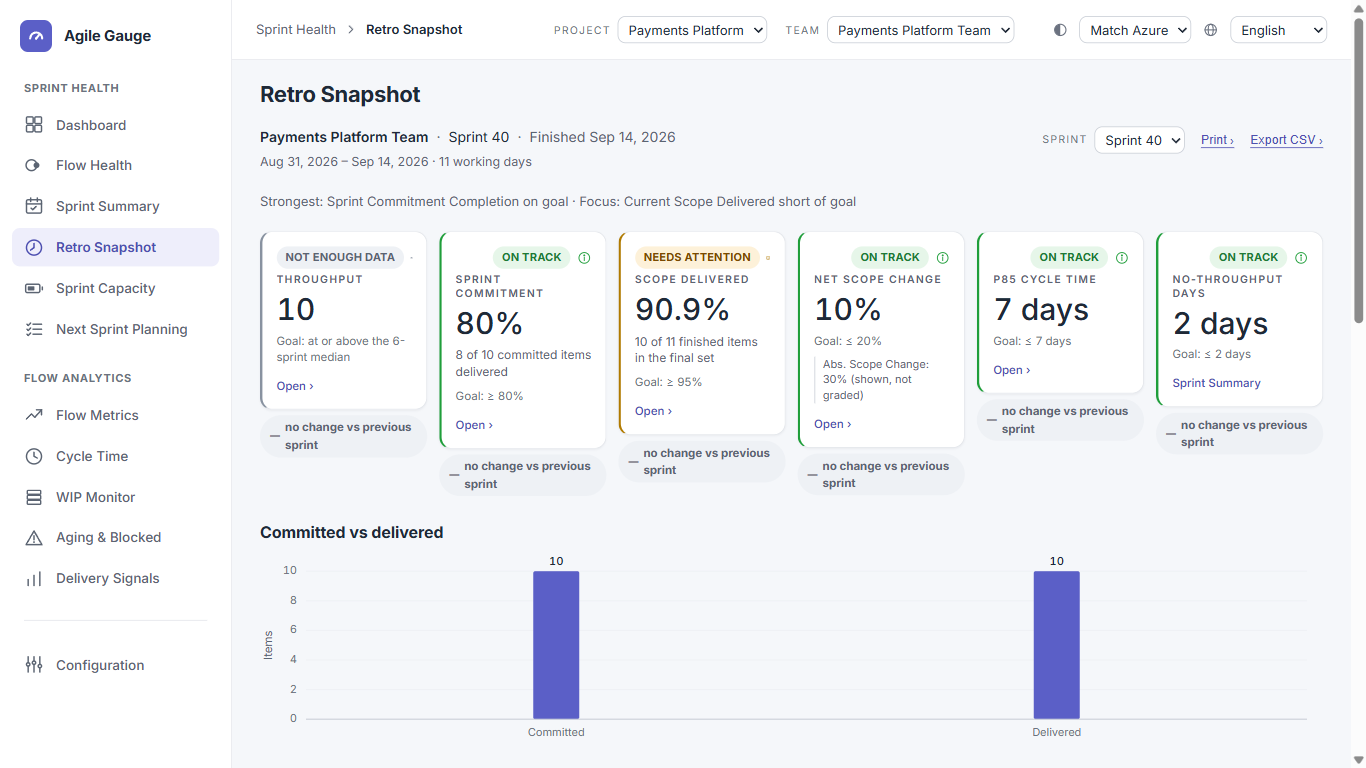
What you see
- A header: team name, sprint name, "Finished {date}," the date range, and the working-day count for that sprint.
- A Team picker (only shown when more than one team is available), a Sprint picker (finished sprints only, newest first, up to the last 12), and a Set picker once more than one team set exists.
- Print › and Export CSV › buttons — see Printing a Retro Snapshot for exactly what each produces.
- The same six KPI tiles as Flow Health — Throughput, Sprint Commitment, Scope Delivered, Net Scope Change, P85 Cycle Time, No-Throughput Days — each additionally showing a change versus the previous sprint.
- "Committed vs delivered" — a bar chart plus five tabs: Carried over, Added mid-sprint, Removed, Blocked at any point, and Closed without ever being active.
- "Cycle-time distribution" — a scatterplot of every item finished this sprint, with a labelled P85 reference line.
- "What to celebrate" and "Where to focus next" for this one team.
How we calculate it
Retro Snapshot uses the exact same engine, the same six KPI definitions, and the same goals as Flow Health — see Flow Health, "How we calculate it" for the formulas. The one difference is the comparison window: Retro Snapshot always compares against exactly the one sprint before it, never a six-sprint trend.
- "Closed without ever being active"
- A finished item with no recorded start-of-work timestamp at all — it went straight from creation to a done state without the workflow ever recording it as started.
- Throughput
- Because Retro Snapshot only ever has one or two sprints of history for a single team, Throughput is essentially never graded against a trend here (Flow Health's trend rule needs at least three points) — it's shown as a plain number with a note explaining why, rather than a status.
What you can click through to
- Every KPI tile except No-Throughput Days opens the exact items behind that number.
- No-Throughput Days opens Sprint Summary for the sprint instead — there's nothing to list for a day count.
- Every item row (in the five tabs, the cycle-time chart, or a KPI's item list) opens that item's detail and its journey through the mapped workflow stages, plus a link straight to the item in Azure DevOps.
Tip
Goals shown here are the same ones set from Flow Health's Goals panel for this team's team set — Retro Snapshot has no separate goal editor of its own.
Known limits
- No goal-editing on this page — edit goals from Flow Health.
- No cross-team view inside Retro Snapshot itself; it always shows one team at a time.
- Throughput is rarely shown with a real status here, for the reason above.