Sprint Summary
One team, one sprint: what did they commit to, and what did they deliver? The gap between those two numbers is commitment reliability.
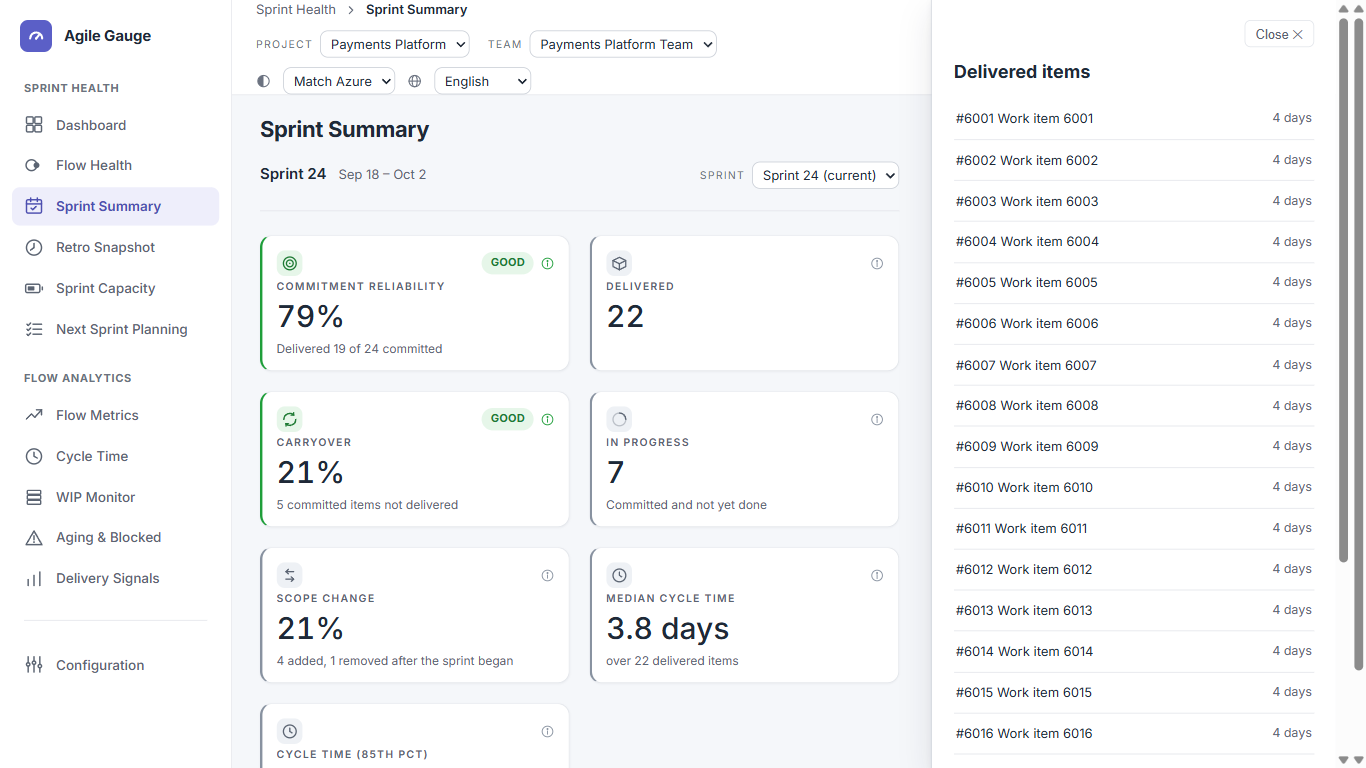
What you see
- The sprint's name and date range, and a Sprint selector listing the current sprint plus up to the 6 most recently finished sprints.
- Stat cards: Commitment reliability, Delivered, Carryover, In progress, Scope Change, Median Cycle Time, and Cycle p85. Every card is clickable and opens the exact items behind its number.
How we calculate it
- Which sprint is shown
- The active sprint, if it has anything usable. If the active sprint has nothing committed yet, or has already ended with nothing to show, Sprint Summary searches back through up to the last 6 finished sprints for one with real activity.
- The Day-1 baseline
- "Committed" means what the sprint held at the end of its first day. Where possible this comes from Azure DevOps' own history; where that history is unavailable (common on imported data), it's reconstructed by replaying each item's sprint-assignment history instead, and the page says which method it used.
- When there's no baseline at all
- If neither method can establish a real Day-1 snapshot, the sprint's current membership would otherwise be mistaken for "committed," making reliability read close to 100% and carryover close to 0% no matter how the sprint actually went. Rather than show a misleading number, Commitment reliability and Carryover are not drawn at all in this case — a panel explains why.
- Commitment reliability
- Delivered-and-committed items ÷ committed items, as a percentage. Items removed from Azure DevOps altogether are excluded from both sides — a team is neither credited nor penalised for work the business withdrew. An item still counts as delivered if it finished up to 24 hours after the sprint's own end, since teams routinely close out the last item or two the morning after sprint review.
- Carryover
- Committed items not delivered by sprint end — still open, rolled forward, or finished late — as a count and as a percentage of committed.
- Scope Change
- (Items added after Day 1 + items removed after Day 1) ÷ total items, as a percentage. An item both added and later removed again counts in neither group.
- Median Cycle Time and Cycle p85
- The same definition Cycle Time uses — see Cycle Time, "How we calculate it" — computed for just this one sprint's finished items.
All of the above is pre-filtered by whatever work item types your organization has configured to count toward metrics (Configuration → Item Types); until you configure that, every type is included.
What you can click through to
- The Sprint selector switches the whole page to a different sprint.
- Every stat card opens a list of the exact items behind that figure — Committed, Delivered, Carryover, In progress, and Scope Change's Added/Removed groups.
- Every item in those lists opens further into that item's own detail, its cycle-time, a link to open it in Azure DevOps, and its journey through the mapped workflow stages.
Tip
If Sprint Summary says the sprint plan was rebuilt from item history rather than read directly, a sprint that moved a very large number of items may have missed recovering a few — reliability in that case can read slightly more generous than it should.
Known limits
- A team's first-ever sprint, or a team with no sprints at all, shows "no sprints yet" rather than any figures.
- Picking a sprint via a shared link that names a sprint the team no longer has silently falls back to the normal pick, rather than showing an error.